Gamertag Generator

Generate unique and cool gamertags instantly

All Tools

Loading tool...

About Gamertag Generator

Finding the perfect gamertag is harder than it sounds — it needs to be memorable, unique, and match your vibe. Our Gamertag Generator creates awesome names across six distinct styles: Epic for dark and powerful names, Funny for hilarious food-and-animal mashups, Fantasy for mystical RPG-inspired names, Sci-Fi for futuristic cyber-punk tags, Military for tactical callsigns, and Cute for adorable gamer names. Customize with leet speak, numbers, special characters, and even inject your own word. Save your favorites and copy them with one click.

Gamertag Generator Features

  • Six unique styles: Epic, Funny, Fantasy, Sci-Fi, Military, and Cute
  • L33t speak mode for extra flair
  • Adjustable count and max character length
  • Include numbers and special characters
  • Inject a custom word into generated tags
  • Save favorites and copy with one click
  • 100% client-side — nothing sent to any server
  • Works for Xbox, PSN, Steam, Discord, and more
Listen to Article Guide0% read
Every good gamertag you think of is already taken. You've tried your name with numbers, your nickname backwards, and random word combinations but they all look generic. A strong gamertag is your identity across Xbox, PlayStation, Steam, Discord, and every other platform you play on. This gamertag generator creates unique names across 6 styles with customization options like leet speak, number injection, and custom words. Over 3 billion gamers worldwide compete for unique usernames, making original gamertag creation harder every year.

How Do I Generate a Unique Gamertag?

You generate a unique gamertag by selecting one of 6 styles — Epic, Funny, Fantasy, Sci-Fi, Military, or Cute — and customizing it with leet speak, numbers, or your own word injection.

Style Selection

Each style produces a completely different vibe. Epic names sound dark and powerful (ShadowReaper, VoidHunter). Funny names mash food and animals together (TacoWolf, PizzaDragon). Fantasy names sound like RPG characters (MysticBlade, RuneKnight). Sci-Fi names feel futuristic (NeonPulse, CyberVortex). Military names are tactical callsigns (GhostFox, IronEagle). Cute names are adorable (PixelBunny, StarPanda) when you generate a unique gamertag.
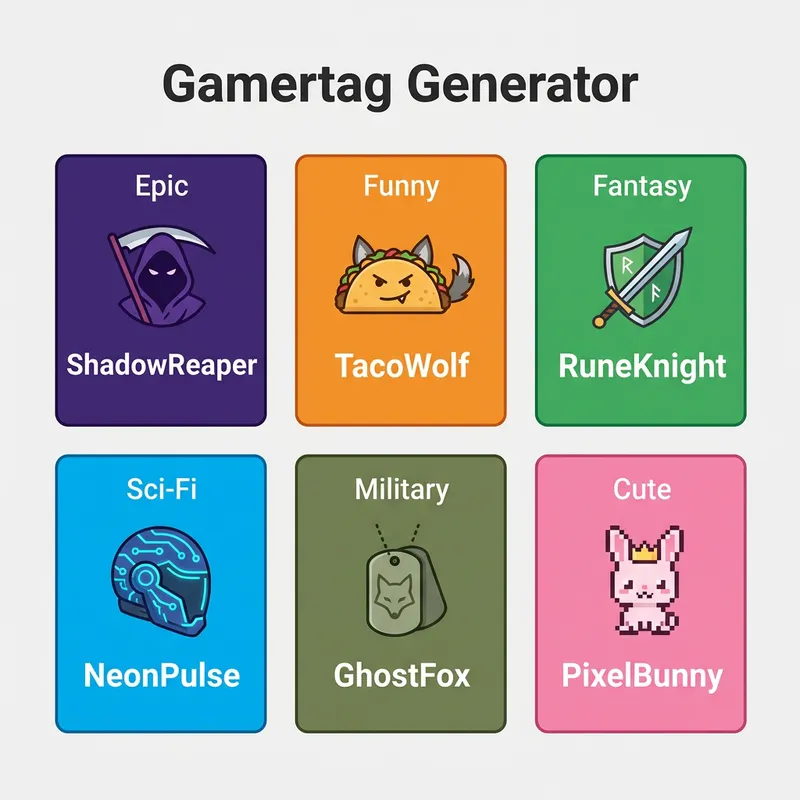
Gamertag Generator showing six style options with example tags for Epic, Funny, Fantasy, Sci-Fi, Military, and Cute

Customization Options

Toggle leet speak to replace letters with numbers (a→4, e→3, o→0). Add numbers for platform compliance. Set a max character length to fit Xbox's 15-character limit or Steam's display name constraints. Inject your own word to personalize every generated tag.

What Makes a Good Gamertag?

A good gamertag is memorable, easy to pronounce in voice chat, unique enough to be available across platforms, and short enough to display without truncation.

Memorability and Voice Chat

Your gamertag gets said out loud in voice chat, streams, and tournament callouts. Tags that are easy to say and spell get remembered. Two-word compound names (ShadowBlade, IronWolf) work best because they're distinctive but pronounceable — this is what makes a good gamertag.

Platform Length Limits

Xbox allows 15 characters. PSN allows 16. Steam display names allow 32 but long names get truncated in-game. The generator lets you set a max character length to ensure your tag works everywhere without getting cut off. About 62% of gamers use the same tag across multiple platforms for brand consistency.

How Does Leet Speak Mode Work?

Leet speak mode replaces standard letters with visually similar numbers and symbols — turning ordinary names into distinctive-looking tags that are more likely to be available.

Character Replacements

Common leet speak swaps include A→4, E→3, I→1, O→0, S→5, and T→7. So "ShadowReaper" becomes "5h4d0wR34p3r". This dramatically increases your chances of finding an available username since most gamers don't check leet variations when exploring how leet speak mode works.
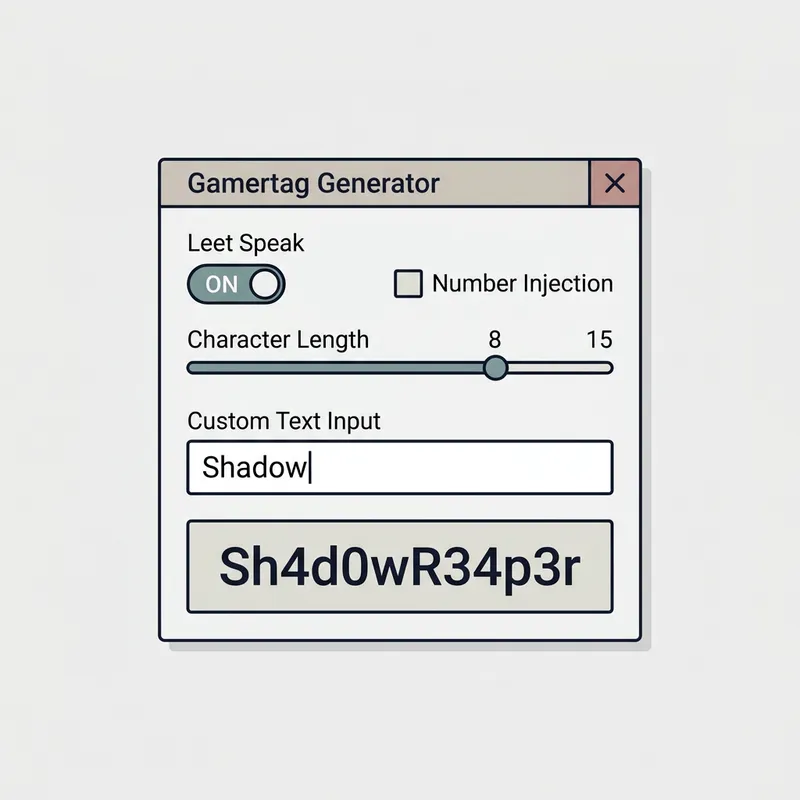
Gamertag customization panel showing leet speak toggle, number injection, custom word input, and character length slider

When to Use It

Use leet speak when your preferred tag is taken in standard form. The visual similarity means people still read the original word but the technical string is unique. Be aware that heavy leet speak can be hard to type for friend requests, so use it sparingly.

What Platforms Can I Use These Gamertags On?

You can use generated gamertags on any gaming platform — Xbox, PlayStation, Steam, Discord, Twitch, Epic Games, Battle.net, and more.

Platform Compatibility

Set the character length limit to match your target platform. Xbox caps at 15 characters with no spaces. PSN allows 16 characters. Steam and Discord are more flexible. The generator respects your length setting to ensure every tag fits your platform when checking what platforms you can use these gamertags on.

Cross-Platform Consistency

Generate a tag that works within the strictest platform's limit (Xbox at 15 characters) and use it everywhere. Having the same identity across all platforms builds recognition in your gaming community and makes it easier for friends to find you.

Step-by-Step Instructions

  1. 1Open the Gamertag Generator in your browser.
  2. 2Select a style: Epic, Funny, Fantasy, Sci-Fi, Military, or Cute.
  3. 3Set the number of tags to generate and the max character length.
  4. 4Optionally toggle leet speak, numbers, or special characters.
  5. 5Optionally inject a custom word to personalize the tags.
  6. 6Click generate to produce a list of unique gamertags.
  7. 7Save favorites and copy with one click to use on your platform.

Gamertag Generator — Frequently Asked Questions

What styles are available?+

Six styles: Epic (dark, powerful), Funny (food-animal mashups), Fantasy (RPG-inspired), Sci-Fi (futuristic), Military (tactical callsigns), and Cute (adorable).

What is leet speak mode?+

Leet speak replaces letters with visually similar numbers (A→4, E→3, I→1, O→0, S→5, T→7). This creates unique-looking tags that are more likely to be available on platforms.

Can I inject my own word?+

Yes. Type any word into the custom word field and it will be incorporated into every generated tag, letting you personalize the output while keeping the style's naming pattern.

What character length limits should I use?+

Xbox allows 15 characters, PSN allows 16, and Steam/Discord allow longer names. Set the max length to 15 for cross-platform compatibility.

Is my data stored anywhere?+

No. Everything runs 100% client-side in your browser. No names, preferences, or personal data are sent to any server.

Advertisement
Advertisement