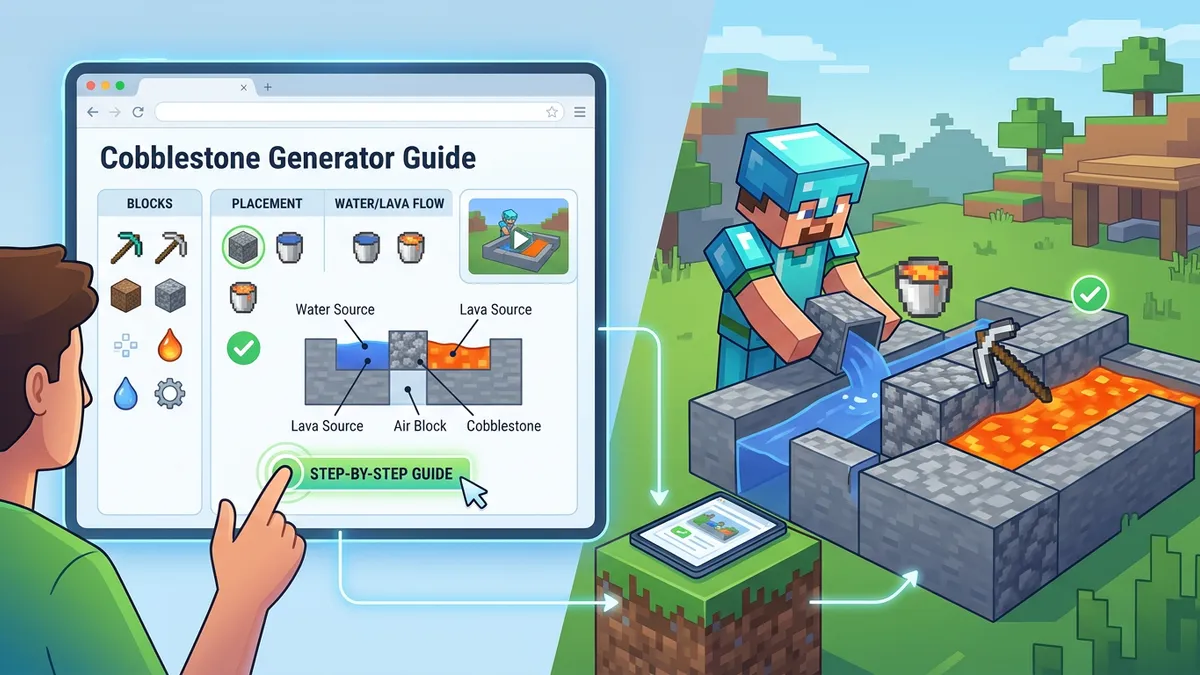
Cobblestone Generator Guide

Cobblestone Generator Guide

Interactive blueprints for 4 Minecraft cobblestone generator designs — basic to fully automatic

GamingFreeNo Signup
4.5(358 reviews)
All Tools

Loading tool...

About Cobblestone Generator Guide

Build the perfect cobblestone generator in Minecraft with our interactive visual guide. Choose from 4 designs — Basic (easy, manual), Piston Auto-Miner (semi-automatic), AFK Generator (fully automatic with hoppers), and Stone Generator (produces smooth stone). Each design includes step-by-step animated blueprints, materials lists with copy-to-clipboard, output rate calculations, tips, and Bedrock/Java compatibility notes. Essential for Skyblock, survival, and server builds.

Cobblestone Generator Guide Features

  • 4 generator designs (Basic, Piston, AFK, Stone)
  • Interactive step-by-step animated blueprints
  • Block type tooltips on hover
  • Materials list with copy-to-clipboard
  • Output rate calculations per design
  • Difficulty ratings (Easy, Medium, Hard)
  • Bedrock Edition compatibility notes
  • Design selector with instant switching
  • Block legend per step
  • Safety tips and common mistakes
  • Stone generator variant
  • AFK collection system guide
  • Piston auto-miner with observer/redstone
  • No download or signup required
  • 100% client-side — no server processing
Cobblestone is the backbone of every Minecraft world — crafting recipes for furnaces, stone tools, brewing stands, and dispensers all require it. According to the Minecraft Wiki, cobblestone appears in over 30 crafting recipes and is the single most-used block in survival mode. A well-built cobblestone generator provides an infinite, renewable source without ever mining a cave. Our interactive guide covers 4 designs — from a simple beginner trench to a fully automatic AFK farm with hoppers and chests — with step-by-step visual blueprints, materials lists, and Bedrock Edition compatibility notes for every design.

How Cobblestone Generators Work in Minecraft

Minecraft cobblestone generator showing water and lava meeting to form cobblestone block

Cobblestone generators exploit a fundamental Minecraft mechanic: when flowing lava meets flowing water, the lava converts into cobblestone. This interaction is deterministic and instant — the cobblestone block appears immediately and can be mined, after which the lava-water interaction regenerates it. The mechanic was first documented in Minecraft Alpha and has remained unchanged through every version since, as confirmed by the Minecraft Wiki's cobblestone farming tutorial.

The Critical Difference: Flowing vs Source

The most common mistake new players make is confusing flowing and source blocks. The interaction rules are strict:

Water StateLava StateResult
FlowingFlowingCobblestone ✅
SourceFlowingCobblestone ✅
FlowingSourceObsidian ❌ (lava destroyed)
SourceSourceObsidian ❌ (lava destroyed)
Water on topSource belowStone ✅ (special case)

Every generator design ensures that water never reaches the lava source block. The deep hole in the basic design catches the water flow before it can travel far enough to reach the lava source. In Skyblock, where lava is precious (often just one bucket), getting this wrong means permanently losing your most valuable resource.

Java vs Bedrock Flow Mechanics

Water flows 8 blocks on flat ground in both editions. Lava flows 4 blocks in Java and 4 blocks in Bedrock (Overworld). In the Nether, lava flows further (like water), which affects Nether-based generators. The basic cobblestone generator design works identically on both editions.

Basic vs Automatic Cobblestone Generator: Which Should You Build?

Choosing the right generator design depends on your game stage, available resources, and how much cobblestone you need. Here's a comparison of each design our tool covers:

DesignDifficultyOutputMaterialsAFK?Best For
BasicEasy~300/min2 buckets, 10 blocksNoEarly game, Skyblock start
Piston Auto-MinerMedium~400/min+ Piston, Observer, RedstoneSemiMid-game bulk collection
AFK GeneratorHard~200/min+ Hoppers, ChestsYesOvernight farming, server builds
Stone GeneratorMedium~250/min2 buckets, 12 blocksNoBuilders needing smooth stone

Early Game (Days 1-3)

Build the Basic Generator immediately. You need just 2 buckets and some dirt. On Skyblock, this is your literal lifeline — without it, you cannot expand your island. The basic design produces ~300 cobblestone per minute with manual mining using Efficiency V.

Mid-Game (Diamond Tier+)

Upgrade to the Piston Auto-Miner. The observer + piston combo pushes cobblestone into a row, letting you mine 12 blocks at once instead of one at a time. Combined with an Efficiency V pickaxe and Haste II beacon, you can produce over 400 blocks per minute.

Late Game (AFK Farming)

Build the AFK Generator when you have hoppers and chests. Walk away and cobblestone collects automatically. You must stay within 128 blocks for chunks to remain loaded. Many servers have AFK timer limits, so check your server's rules.

Builders & Decorators

The Stone Generator produces smooth stone directly, skipping the furnace step entirely. This saves coal and time when you need large amounts of stone, polished stone, or stone bricks for builds.

How to Build an Automatic Cobblestone Generator (No Mining)

Automatic cobblestone generator with pistons, observers, and hopper collection system

The number one related search for cobblestone generators is "automatic cobblestone generator no mining." Here's how to build a fully hands-free system:

Required Components

  • Observer — detects when cobblestone forms (block state change)
  • Piston — pushes cobblestone off the generation point
  • Redstone — connects observer to piston for automatic triggering
  • Hoppers — collect broken cobblestone items underneath
  • Chest — stores collected cobblestone

How the Automation Works

The cycle is: cobblestone forms → observer detects the change → observer sends redstone pulse → piston fires → cobblestone is pushed/broken → items fall through hoppers → items collect in chest → cycle repeats. The entire process runs without player interaction.

Bedrock Edition Differences

On Bedrock Edition, observer behavior has a one-tick difference compared to Java. You may need a repeater or pulse extender between the observer and piston to ensure proper timing. Test your design on Bedrock by placing and breaking a block where cobblestone will form — the piston should fire once per block placement.

Output Optimization

Single-generator AFK farms produce ~200 cobblestone per minute. To increase output: stack multiple generators vertically, use a water stream to consolidate items to one hopper line, and connect chests in a chain. Professional server farms using this design report sustained rates of 1,000+ cobblestone per minute with multi-layer setups.

How to Make a Stone Generator in Minecraft with Lava and Water

A related search that consistently appears alongside cobblestone generators is "how to make a stone generator in Minecraft with lava and water." Stone generators use a special mechanic: when water flows onto a lava source block from above, the result is stone (not cobblestone, not obsidian).

Why Build a Stone Generator?

  • Skip smelting — cobblestone requires furnace fuel to become stone; stone generators produce it directly
  • Save coal/charcoal — no fuel cost per block
  • Faster builds — stone, polished stone, stone bricks, and smooth stone all derive from stone blocks
  • Efficiency — one Silk Touch pickaxe mines stone blocks directly

The Key Mechanic

Water must flow down onto the lava source — the direction matters. Side-flowing water onto a lava source creates obsidian. Top-flowing water onto a lava source creates stone. Our guide's Stone Generator design uses a gap in the ceiling to channel water downward onto a lava source below.

Stone vs Cobblestone: When to Use Each

Block TypeProduced ByBest Uses
CobblestoneBasic/Piston/AFK GeneratorTools, furnaces, early builds
StoneStone GeneratorStone bricks, polished stone, builds
Smooth StoneSmelting stone in furnaceBlast furnaces, smooth stone slabs

Cobblestone Generator for Skyblock: Essential Build Guide

In Skyblock, the cobblestone generator isn't optional — it's the most critical build on your island. Without it, you cannot expand, craft tools, or progress. Here's what makes Skyblock generators uniquely important:

Why Lava Is Sacred in Skyblock

Most Skyblock maps start you with exactly one lava bucket. If water converts your lava source to obsidian, you permanently lose your ability to generate cobblestone unless the map has a lava respawn mechanic. Follow our Basic Generator design exactly — it's specifically designed to protect the lava source.

Skyblock Progression Path

  1. Day 1 — Build Basic Cobblestone Generator (first priority)
  2. Days 2-5 — Use cobblestone to expand island, build furnaces, craft stone tools
  3. Days 5-10 — Upgrade to Piston Auto-Miner once you have iron for pistons
  4. Week 2+ — Build AFK Generator once you have iron for hoppers

Common Skyblock Mistakes

  • Placing lava first — always place water first; if lava flows before water catches it, you risk obsidian conversion
  • Building over the void — place blocks under your generator first; dropped items over the void are lost forever
  • No wall behind lava — lava flowing the wrong direction can fall off the island
  • Testing random designs — with only one lava bucket, use a proven design like our guide's Basic Generator

Is a Cobblestone Generator Worth Building?

Absolutely — in Skyblock it's mandatory. In survival mode, it's still highly valuable: mining cobblestone from caves is slower and more dangerous than a surface generator. A basic generator with an Efficiency V pickaxe produces more cobblestone per minute than cave mining with the same pickaxe, with zero risk of creeper explosions or lava death.

Step-by-Step Instructions

  1. 1Open the Cobblestone Generator Guide — no download, login, or mods needed.
  2. 2Choose a design from the top selector: Basic, Piston Auto-Miner, AFK, or Stone Generator.
  3. 3Review the materials list on the left panel — click Copy to save it.
  4. 4Check the output rate and difficulty badge to ensure it matches your needs.
  5. 5Follow Step 1 — dig the trench or build the chamber as shown in the interactive grid.
  6. 6Hover over any block in the grid to see its type (Water, Lava, Cobblestone, Piston, etc.).
  7. 7Click Next to advance through each step. The grid animates to show changes.
  8. 8For Piston/AFK designs, note the redstone and observer placements carefully.
  9. 9Read the Tips panel for common mistakes and safety warnings.
  10. 10Check the Bedrock note at the bottom if playing on PE, Xbox, PlayStation, or Switch.

Cobblestone Generator Guide — Frequently Asked Questions

Why did my lava turn into obsidian instead of cobblestone?+

Water touched your lava SOURCE block directly. This happens when water flows horizontally into the lava source instead of meeting only flowing lava. The solution is our Basic Generator design — the deep hole catches the water before it reaches the lava source. Always place water first and ensure the hole absorbs the flow.

Does the cobblestone generator work in Minecraft Bedrock Edition?+

Yes — all 4 designs in our guide work on Bedrock Edition (PE, Xbox, PlayStation, Switch, Windows 10). The basic water/lava mechanics are identical. For the Piston and AFK designs, Bedrock's observer may need a repeater for timing adjustment since redstone ticks differ slightly between editions.

Is a cobblestone generator worth building in survival mode?+

Yes — a basic generator with an Efficiency V pickaxe produces roughly 300 cobblestone per minute with zero risk. Cave mining is slower and dangerous (creepers, lava, fall damage). In Skyblock, it's not optional — it's the single most critical build for island progression. Even in regular survival, it saves significant time for large building projects.

How do I make a stone generator instead of cobblestone?+

Use our Stone Generator design — water must flow DOWN onto a lava source block from above (not from the side). This special interaction produces smooth stone directly, skipping the furnace smelting step. You'll need a Silk Touch pickaxe to collect stone blocks; without Silk Touch, mining stone drops cobblestone.

How fast does cobblestone regenerate?+

Cobblestone regenerates instantly — the moment you mine it, the game recalculates the lava-water interaction and creates a new cobblestone block. Mining speed depends on your pickaxe: a bare hand takes 10 seconds, wooden pickaxe 1.5s, diamond pickaxe 0.4s, and Efficiency V netherite with Haste II is nearly instant.

How to AFK a cobblestone generator?+

Build our AFK Generator design: observers detect cobblestone formation, pistons push it off the generation point, broken items fall through hoppers into chests. You must stay within 128 blocks for the chunk to remain loaded. Some servers have AFK kick timers — use an AFK pool or check server rules.

Can I build a cobblestone generator in the Nether?+

Water evaporates instantly in the Nether (Java Edition), so traditional cobblestone generators don't work there. However, you can use a basalt generator instead: place soul soil with blue ice adjacent, then pour lava on top — this creates basalt. In Bedrock Edition, water can be placed in the Nether using commands.

How many chests is 1,728 cobblestone?+

Exactly 1 double chest (1 large chest = 54 slots × 64 stack = 3,456 items). So 1,728 cobblestone fills half a double chest or fills one single chest completely (27 slots × 64 = 1,728). An AFK generator at ~200/min fills a double chest in approximately 17 minutes.

What's the best pickaxe for a cobblestone generator?+

For manual mining: Netherite pickaxe with Efficiency V, Unbreaking III, and Mending, combined with a Haste II beacon. This setup mines cobblestone near-instantly and never breaks. For automatic generators, you don't need a pickaxe at all — pistons and TNT handle the mining.

Can I use a cobblestone generator for basalt?+

No — basalt uses a completely different mechanic. Basalt generators require soul soil, blue ice, and lava flowing on top. Cobblestone generators use the water + lava flow interaction. Both produce infinite blocks, but the mechanics and designs are separate.

Share this tool: