Minecraft Banner Generator

Minecraft Banner Generator

Design custom Minecraft banners with patterns and colors

GamingFreeNo Signup
4.4(825 reviews)
All Tools

Loading tool...

About Minecraft Banner Generator

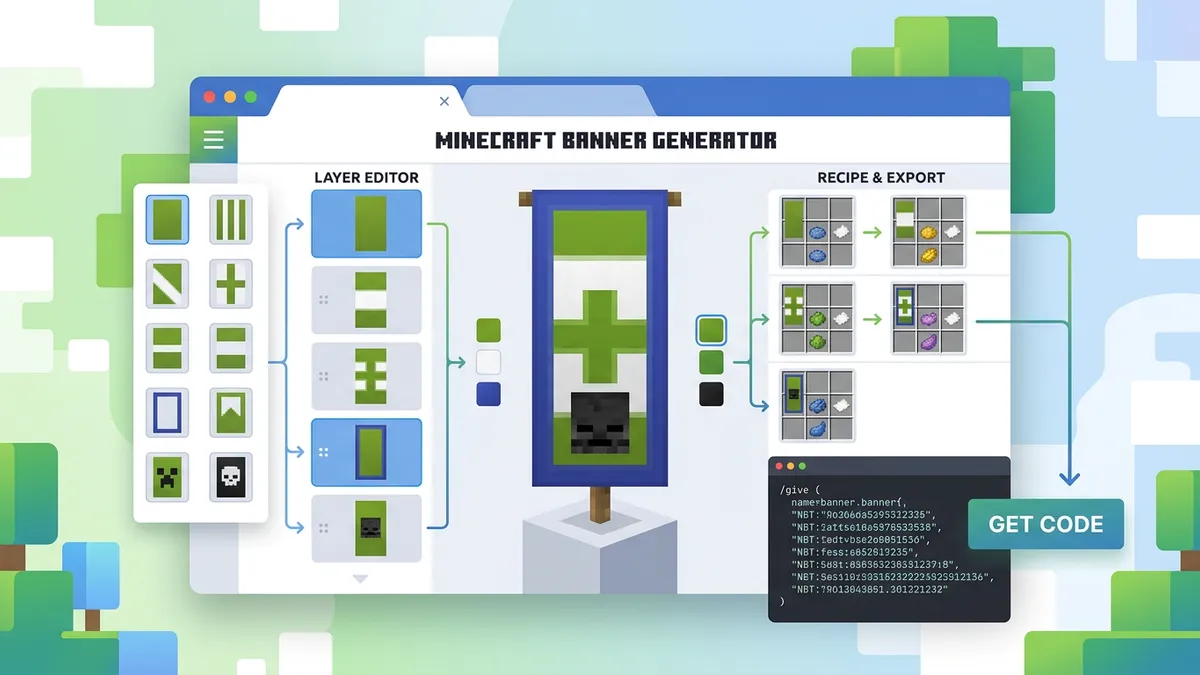
Design custom Minecraft banners online with this free generator. Choose from 16 dye colors and 22 pattern types including stripes, cross, saltire, gradients, bricks, skull, creeper, and globe. Stack up to 6 layers, reorder them freely, preview your banner in real time, download as PNG, and copy the exact /give command for Java Edition. Works for banner designs, shield patterns, and decorative builds.

Minecraft Banner Generator Features

  • 22 banner patterns
  • 16 dye colors
  • Up to 6 layers
  • Reorder layers (drag up/down)
  • Live banner preview
  • Banner shape mask
  • PNG download
  • /give command output
  • One-click copy
  • No download or signup
Banners are one of Minecraft's most versatile decorative blocks — used for team flags, shield designs, map markers, and building decorations. But the crafting system for banner patterns is confusing: you need specific dye arrangements on a loom, and the results aren't always obvious. Our free Minecraft Banner Generator lets you visually design your banner, stack up to 6 pattern layers, preview the result in real time, and copy the exact /give command to create it instantly in-game.

How to Use the Minecraft Banner Generator

Minecraft Banner Generator interface showing pattern selection and live preview

Step 1 — Choose a Base Color

Select one of 16 dye colors as your banner's background. This is the color of the blank banner before any patterns are applied. The most common base colors are white, black, and red.

Step 2 — Select a Pattern

Choose from 22 patterns: stripes (top, bottom, left, right, center, middle), cross, saltire, diagonals, triangles, circle, rhombus, border, gradients, bricks, skull, creeper face, and globe.

Step 3 — Pick the Pattern Color

Select the dye color for the pattern layer. This creates contrast against the base color.

Step 4 — Add the Layer

Click Add Layer to stack the pattern onto your banner. You can add up to 6 layers, which is Minecraft's maximum. Use the arrow buttons to reorder layers — layer order affects how patterns overlap.

Step 5 — Export

Download the banner as a PNG image for reference, or copy the /give command to paste directly into Minecraft's chat. The command includes all pattern data in NBT format.

All Minecraft Banner Patterns Explained

Minecraft supports many banner patterns, each with a unique code used in commands and loom recipes. Here are the most popular ones:

PatternCodeHow to Craft
Stripe Bottombs3 dye on bottom row of loom
CrosscrDye in + shape on loom
SaltirescDye in X shape on loom
Gradientgra/gruDye fade top-to-bottom
BorderboDye around edges of loom
BricksbriBrick + banner on loom
CreepercreCreeper Head + banner on loom
SkullskuWither Skeleton Skull + banner
GlobeglbGlobe pattern (cartographer trade)

Tip: Some patterns (creeper, skull, globe) require special items — they can't be crafted with dye alone. These patterns are unlocked on the loom by placing the pattern item alongside the banner.

Cool Banner Design Ideas for Minecraft

Various Minecraft banner designs including country flags, team logos, and decorative patterns
  • Country Flags — Use stripe patterns (top, center, bottom) with 3 colors to approximate real flags. Works great for international server events.
  • Team Colors — Create matching banners for PvP teams using gradient backgrounds with a central symbol (rhombus, skull, or creeper).
  • Shield Designs — Any banner can be applied to a shield in Java Edition. Combine a shield with your banner on a crafting table for a decorated shield.
  • Map Markers — Place a named banner in the world, then right-click a map on it. The banner name appears as a marker on the map — great for marking bases, farms, and landmarks.
  • Letter Banners — Combine specific stripe patterns to spell words on walls. Popular for naming shops, roads, and buildings on servers.
  • Gradient Art — Stack gradient patterns in different colors to create sunset-like effects on walls and ceilings.

Crafting vs Commands: How to Make Banners in Minecraft

Method 1: Loom (Survival Mode)

Place a banner + dye in the loom to apply one pattern. You can stack up to 6 patterns by repeating this process. The loom UI shows a preview before confirming.

Method 2: /give Command (Creative / Cheats)

Use the /give command from our generator to create the banner instantly. The command includes all layers as NBT data — no crafting needed. This is the fastest method for creative builds.

Method 3: Banner + Shield

In Java Edition, combine any banner with a shield on a crafting table. The banner's design transfers to the shield. This doesn't work in Bedrock Edition.

Note: Bedrock Edition supports all banner patterns on the loom, but the /give command syntax differs slightly. Our generator produces Java Edition commands. Bedrock players should use the loom for pattern application.

Step-by-Step Instructions

  1. 1Open the Minecraft Banner Generator — no download, login, or mods needed.
  2. 2Choose a base color from the 16 available dye colors.
  3. 3Select a pattern from the 22 options (stripes, cross, creeper, etc.).
  4. 4Pick the pattern color — this creates contrast against the base.
  5. 5Click Add Layer to apply the pattern. You can add up to 6 layers.
  6. 6Reorder layers using the up/down arrows to change how patterns overlap.
  7. 7Preview your banner in real time in the sidebar.
  8. 8Download as PNG or copy the /give command to use in Minecraft.

Minecraft Banner Generator — Frequently Asked Questions

How many layers can a Minecraft banner have?+

A banner can have up to 6 pattern layers in vanilla Minecraft. Each layer adds one pattern in one color on top of the previous layers. Our generator enforces this limit and shows you how many layers you've used.

Can I put a banner on a shield?+

Yes, in Java Edition. Place the banner and shield together on a crafting table to transfer the banner's design to the shield. This does not work in Bedrock Edition — shields in Bedrock cannot display banner patterns.

Does this banner generator work for Bedrock Edition?+

The visual preview and pattern design work for both editions — banner patterns look the same. However, the /give command syntax is Java Edition format. Bedrock players should recreate the design using the loom in-game.

How do I make letters on banners?+

Letters are created by layering specific stripe patterns. For example, the letter 'A' uses stripe left + stripe right + stripe top + stripe middle. Our generator makes this process visual — add each stripe layer and see the letter form in real time.

What special items do I need for rare patterns?+

Three patterns require special items on the loom: Creeper face (Creeper Head), Skull (Wither Skeleton Skull), and Globe (Globe Banner Pattern from cartographer villager). All other patterns use regular dye.

Can I use banners as map markers?+

Yes! Place a named banner in the world (rename it on an anvil first), then use a map on the banner. The banner's name will appear as a labeled marker on your map. This works in both Java and Bedrock editions.

Share this tool: