How Do I Generate a DnD Encounter?
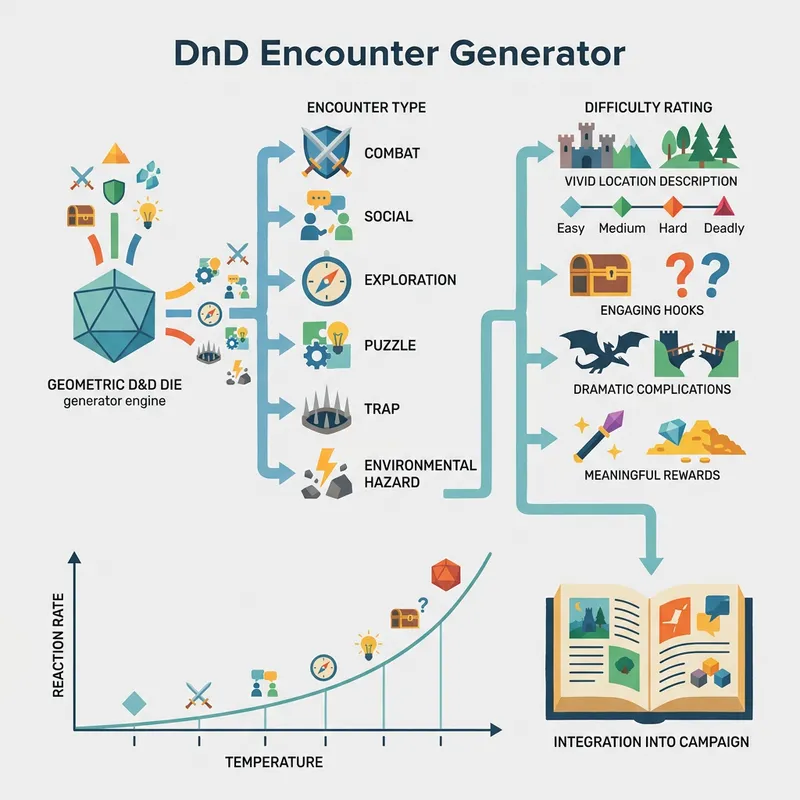
You generate a DnD encounter by clicking the generate button, which instantly produces a complete narrative scenario with type, difficulty, location, hook, complication, and reward.
Encounter Types
The generator produces 6 distinct encounter types: Combat (straight-up battle), Social (negotiation and diplomacy), Exploration (discovering hidden areas), Puzzle (logic challenges), Trap (mechanical or magical hazards), and Environmental Hazard (natural dangers like lava or flooding). Each type creates a different gameplay dynamic when you generate a DnD encounter.
Difficulty Ratings
Encounters generate at Easy, Medium, Hard, or Deadly difficulty. Easy encounters drain minimal resources. Medium encounters challenge the party without serious risk. Hard encounters push the party to their limits. Deadly encounters can cause character deaths if the party plays poorly.
What Makes a Good DnD Encounter?
A good DnD encounter combines a compelling hook that draws players in, a dramatic complication that raises the stakes, and a meaningful reward that makes the effort feel worthwhile.
Hooks That Grab Attention
The generator includes 10 narrative hooks designed to immediately engage players. Good hooks create urgency — a merchant screaming for help, a mysterious light flickering in the ruins, or a wounded soldier crawling toward the party. About 65% of experienced DMs say the hook is the single most important element of a good DnD encounter.
Complications That Raise Stakes
Every encounter includes a complication that prevents the scenario from being a simple A-to-B resolution. Reinforcements arrive, the floor collapses, a hidden enemy reveals themselves, or an innocent bystander gets caught in the crossfire. These twists force players to adapt their strategy mid-encounter and create memorable moments.
How Do I Balance Encounters for My Party?
You balance encounters for your party by selecting the appropriate difficulty rating based on your party's level, size, and available resources.
Difficulty Scaling Guidelines
For a party of 4 level-5 characters, a Medium encounter should drain about 15-20% of their total daily resources. A Hard encounter drains 25-35%. A Deadly encounter risks a total party kill if the dice go badly. Use the difficulty rating as a narrative framework, then adjust the specific monsters and numbers using the companion 5e Encounter Generator for precise CR-based balance encounters for your party.
Mixing Encounter Types
The best sessions alternate between encounter types rather than running 5 combat encounters in a row. Mix a Combat encounter with a Social encounter and a Puzzle to keep the pacing varied. About 82% of players report higher engagement in sessions that include at least 2 different encounter types.
Can I Use This for Online DnD Sessions?
You can use this generator for online DnD sessions by copying the full encounter details and pasting them directly into your virtual tabletop notes or Discord channel.
Virtual Tabletop Integration
The copy button exports the complete encounter — type, difficulty, location description, hook, complication, and reward — as a formatted text block. Paste it into Roll20, Foundry VTT, or any other virtual tabletop's GM notes section. The narrative format works perfectly as a scene description to read aloud to your players when you use this for online DnD sessions.
Session Prep Efficiency
Generate 5-6 encounters before your session and organize them by type and difficulty. This gives you a toolkit of pre-built scenarios you can deploy whenever your players go off-script. Over 71% of DMs who use encounter generators report spending less than half the time on prep compared to building encounters from scratch.
Step-by-Step Instructions
- 1Open the DnD Encounter Generator in your browser.
- 2Click the generate button to create a new encounter scenario.
- 3Review the encounter type (Combat, Social, Exploration, Puzzle, Trap, or Environmental Hazard).
- 4Check the difficulty rating (Easy, Medium, Hard, or Deadly).
- 5Read the location description, narrative hook, and complication.
- 6Note the reward for completing the encounter.
- 7Click the copy button to export the full encounter details.
- 8Paste into your session notes, virtual tabletop, or campaign journal.