GuideGaming

How to Create a Unique Gamertag (Xbox, PSN, Steam & Discord)

Learn what makes a strong gamertag, platform character limits, and how to generate unique names for Xbox, PlayStation, Steam, and Discord — free and fast.

By Generatr Team

Every solid gamertag you invent is already taken. Name-plus-numbers and reversed nicknames look generic, and platforms reject the rest.

This guide covers what makes a tag memorable in voice chat, length limits for Xbox, PSN, and Steam, and a practical workflow to generate options at scale. When you are ready to try styles live, use the free Gamertag Generator — six styles, leet speak, length caps, and one-click copy.

With billions of online gamers competing for short names, a repeatable process beats staring at the “name taken” screen.
Free tool

Use the Gamertag Generator now

Open the interactive gamertag generator in your browser — free, instant, no signup.

Open Gamertag Generator

How Do I Generate a Unique Gamertag?

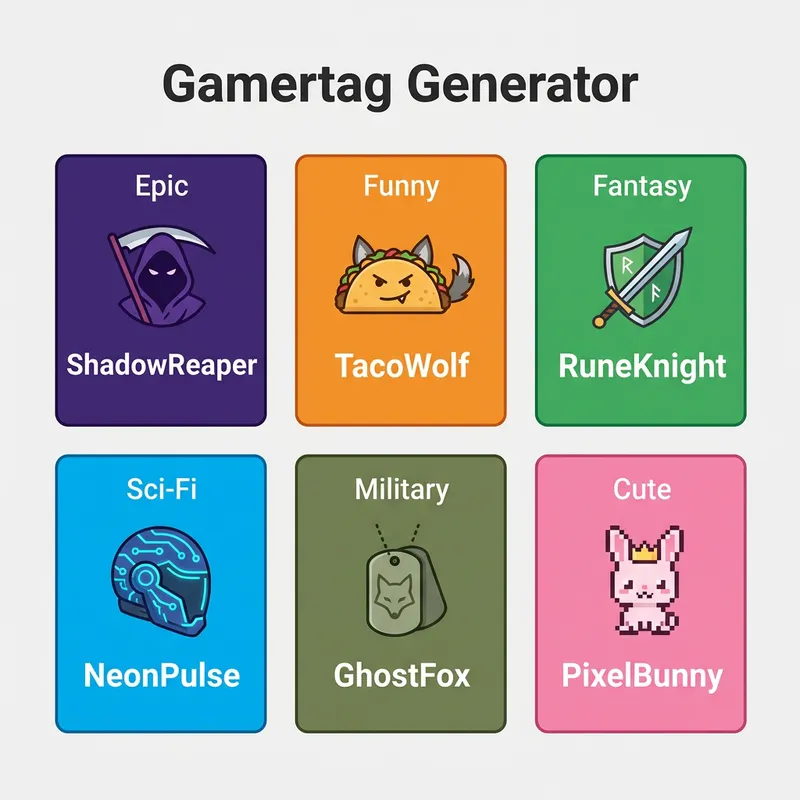
Pick a style (Epic, Funny, Fantasy, Sci-Fi, Military, or Cute), then customize with leet speak, numbers, length limits, or a word you own.

Style selection

Epic leans dark and powerful. Funny mashes food and animals. Fantasy reads like RPG names. Sci-Fi feels cyber. Military uses callsign patterns. Cute stays soft and short. Generate 20–50 options in each style you like, then shortlist five you can say out loud.

Gamertag generator showing six style options with example tags

Customization that improves availability

Leet speak (a→4, e→3) and trailing numbers raise availability without destroying readability. Inject a personal word so every batch feels branded. Cap length early so the same tag works on Xbox and Discord. Try it in the online gamertag generator before you claim names on live platforms.

What Makes a Good Gamertag?

A good gamertag is memorable, easy to pronounce in voice chat, short enough for UI truncation, and unique enough to free up across platforms.

Voice chat first

Teammates will say your name under pressure. Two-word compounds (ShadowBlade, IronWolf) usually win over random letter soup. Avoid pure numbers and symbols that break when someone searches for you.

Platform length limits

  • Xbox — up to 15 characters
  • PlayStation Network — up to 16 characters
  • Steam display names — longer, but UIs often truncate

About 62% of multi-platform players reuse one core tag for brand consistency. Set max length to 15 if you want one name everywhere.

How Should I Check Gamertag Availability?

Generate a shortlist offline first, then test the top three on each platform’s signup or change-name flow.

  1. Generate 30–50 candidates with your preferred style.
  2. Say each name once — drop anything awkward.
  3. Check Xbox, PSN, Steam, and Discord in that order if you play all four.
  4. Save the first tag that is free on your primary platform and close enough on the others.

Keep a backup with a mild number suffix. If you also need Minecraft-facing names, pair this with the Minecraft Name Generator or browse more free tools in our guides hub.

Gamertag Ideas by Game Type

Match the tone of the games you stream or main so your name does not feel random in lobbies.

  • Competitive shooters — Military or Epic, short and sharp
  • RPGs and MMOs — Fantasy compounds with clear pronunciation
  • Party and casual — Funny or Cute for friendlier lobbies
  • Builder / sandbox — Clean names that look good on signs and server lists; see also our Minecraft circle building guide if you publish creative maps

Never pack trademarked character names you do not own — platforms and brands can force a rename later.

Step-by-Step Instructions

  1. 1Open the free Gamertag Generator on Generatr.
  2. 2Choose a style that matches your games (Epic, Funny, Fantasy, Sci-Fi, Military, or Cute).
  3. 3Set max character length (15 for cross-platform Xbox-friendly tags).
  4. 4Toggle leet speak or numbers if common words are taken.
  5. 5Inject a personal word when you want a branded batch.
  6. 6Generate a large batch and shortlist five pronounceable options.
  7. 7Copy favorites and test availability on Xbox, PSN, Steam, and Discord.
  8. 8Claim the best free option and save a backup with a mild suffix.

Frequently Asked Questions

What is a good gamertag length?+

Aim for 8–15 characters so the name fits Xbox and stays readable in most HUDs. Longer Steam display names often get truncated in-game.

How do I make a unique Xbox gamertag?+

Combine two memorable words, stay under 15 characters, and avoid pure numbers. Generate many variants, then check Xbox availability for your top three.

Should I use numbers in my gamertag?+

Use numbers only when the clean word form is taken. Prefer meaningful digits over random strings so the tag stays easy to say and type.

Can I use the same gamertag on every platform?+

Often not at the exact same string, but you can keep a core brand and adjust length or a suffix. Start with a 15-character max so Xbox is not the blocker.

Is this gamertag generator free?+

Yes. The Generatr gamertag generator runs in your browser with no signup. Nothing is sent to a server for name generation.

Ready to try it yourself?

Use the free Gamertag Generator — no download, no account.

Launch Gamertag Generator